Launcher
Windows Quickstart Toolbar
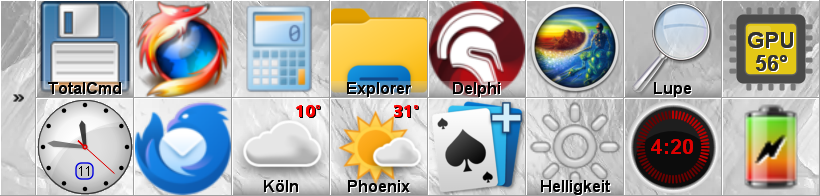
Here I would like to introduce you to a program that has been serving me well for years.
It is an alternative launch bar for Windows that captures, displays and starts files of any kind with a simple mouse click.
Some of the features of the Launcher:
-
Small, extremely fast and resource-friendly, with minimal hardware requirements.
-
Requires no installation and saves nothing to the registry. Available as Setup.exe with uninstaller or as a simple zip archive.
-
Runs independently of assigned drive letters. The perfect solution for USB sticks.
-
Offers a visually appealing and intuitive interface in a freely resizable window with impressively crisp rendering quality.
-
Much more elegant and significantly faster than the Windows Start menu, which is often cluttered and overwhelming.
-
Correctly resolves shortcuts including their parameters, and lets you assign more meaningful labels.
-
Highly flexible arrangement of your icons. The window can be placed anywhere on the desktop and snaps to screen edges.
-
Multiple ways to minimize, hide, keep always in the foreground, or automatically slide off the screen — shows up only when needed!
-
Freely adjustable window transparency with smooth fade-in and fade-out effects.
-
Icons and hotkeys with numerous special functions.
-
Set your own background image, which really comes into its own in combination with a frameless window.
-
A tinted window adapts even better to your desktop background. Pages can also be sorted by color.
-
Simple security concept with a lockable main menu — perfect as parental controls at home or on any shared computer.
-
Use popup windows to display messages of any kind, both on your local machine and on remote computers within your network.
-
Integrated call monitor for incoming and outgoing calls (FritzBox required) with optional reverse number lookup and a warning for suspicious phone numbers.
-
Advanced clipboard with the ability to easily insert frequently used text snippets.
-
Battery indicator for laptops, monitor brightness control, screen magnifier.
-
Localized in 23 languages. (German, English, French, Italian, Spanish, Dutch, Portuguese, Hungarian, Polish, Czech, Swedish, Norwegian, Danish, Finnish, Turkish, Greek, Russian, Arabic, Hindi, Thai, Chinese, Japanese and Korean)
-
and many more ...
Launcher was written in Delphi 12.1. This hobby project has been continuously developed by me for many years. It lives not least from your ideas and suggestions, so your feedback is always welcome.
System requirements: Windows 95, 98, ME, NT, 2000, XP, Vista, Windows 7 to 11
The latest version of the Launcher v5.2.0 has been online since September 1, 2026.